
はじめに
Spec KitとGitHub Copilotを使って、ブラウザで動く簡単なToDoアプリをSpec駆動開発で作ってみました。
Spec駆動開発とは
Spec駆動開発(Specification-Driven Development)とは、コードを書く前に仕様(Spec)を明確に定義して、それを中心に開発を進める手法です。
Spec駆動開発では、以下の流れで開発を行います。
- 仕様(Spec)を書く
- 仕様をレビューし、合意する
- 仕様に沿って実装する
- 仕様を満たしているか検証する
Specとは
Spec駆動開発におけるSpecとは、単なる文章ではなく、以下のようなものを含む実行可能または検証可能な仕様です。
- API仕様(OpenAPIなど)
- 入出力の定義
- ユースケース
- 制約事項
Spec駆動開発が向いているケース
Spec駆動開発に向いているものは以下のようなケースです。
- チーム開発(特に大規模な場合)
- API開発
- マイクロサービス
- AIにコード生成させる開発
Spec Kitとは
Spec Kitは、仕様の作成、設計、タスク定義、実装をAIと一緒に段階的に進めるための開発フレームワークです。
Spec Kitを使った開発では、以下の手順で開発を行っていきます。
- 原則(constitution)
- 仕様(specify)
- 設計(plan)
- タスク分解(tasks)
- 実装(implement)
ToDoアプリを開発する
それでは、実際にSpec KitとCopilotを使って、簡単なToDoアプリを開発してみます。
Spec Kitのインストール
まず初めに、Spec Kitをインストールします。
ターミナル上で以下のコマンドを実行します。
| 1 | uv tool install specify-cli --from git+https://github.com/github/spec-kit.git |
インストールが終わったら、Pathを通しておきます。
| 1 2 | echo 'export PATH="$HOME/.local/bin:$PATH"' >> ~/.zshrc source ~/.zshrc |
プロジェクトを作成する
ターミナルで以下のコマンドを実行してプロジェクトを作成します。
| 1 | specify init todo-app --ai copilot |
すると以下のように表示されます。
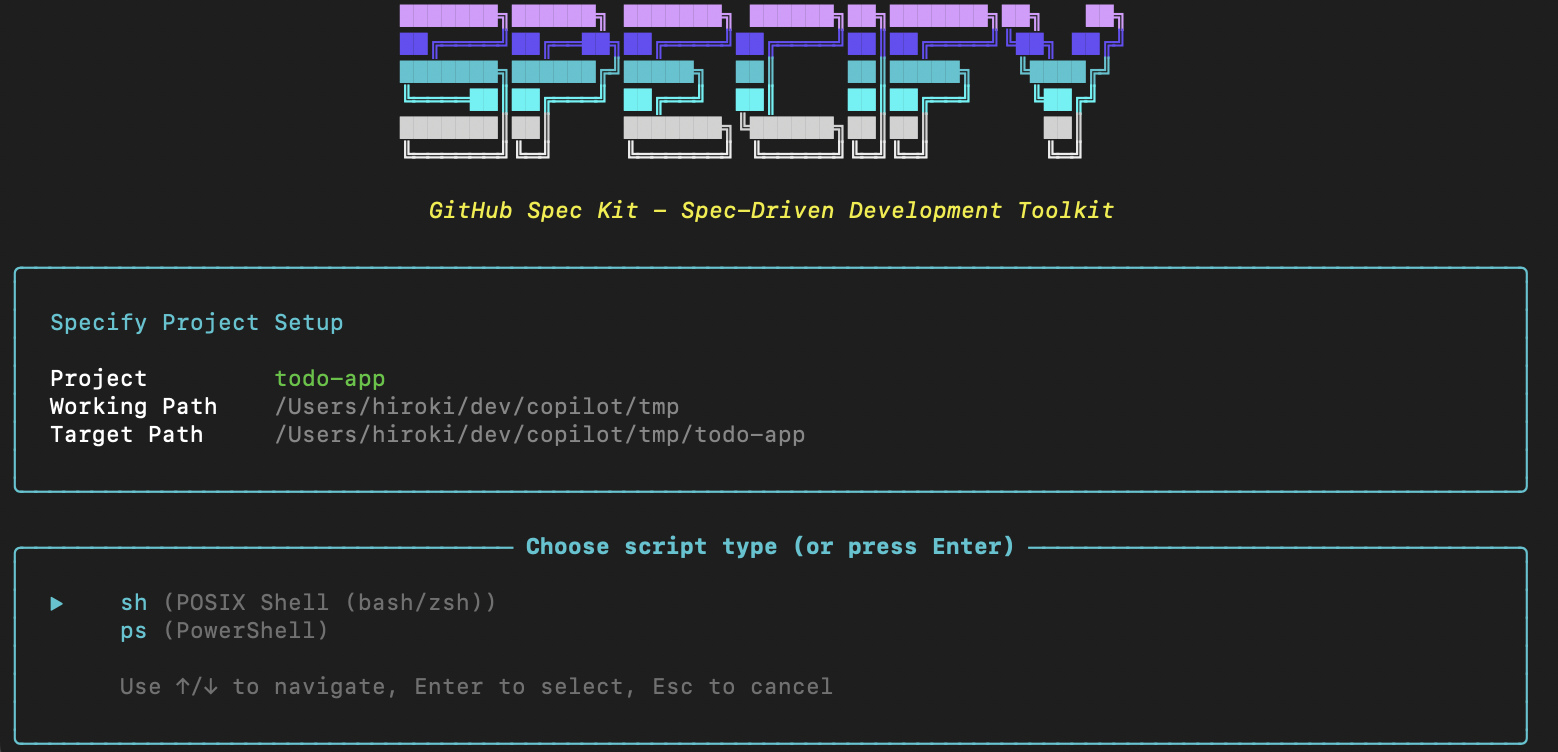
sh
を選択して続けます。
このように表示され、プロジェクトが作成されます。
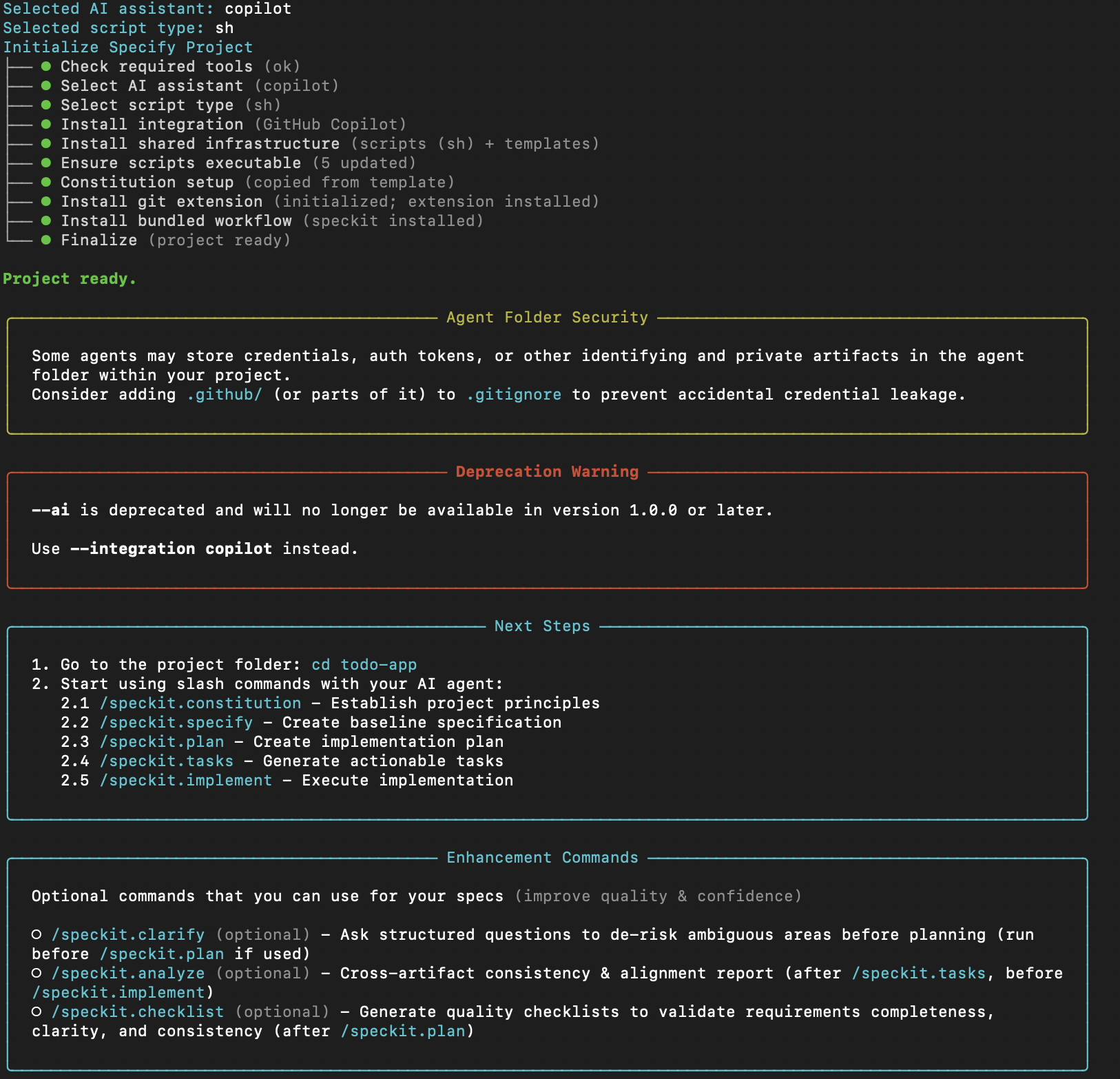
作成直後のフォルダの中身は以下のようになっています。
| 1 2 3 4 5 6 7 8 9 10 11 12 13 14 15 16 17 18 19 20 21 22 23 24 25 26 27 28 29 30 31 32 33 34 35 36 37 38 39 40 41 42 43 44 45 46 47 48 49 50 51 52 53 54 55 56 57 58 59 60 61 62 63 64 65 66 67 68 69 70 71 72 73 74 75 76 77 78 79 80 81 82 83 84 85 86 87 88 89 90 91 92 93 94 | . ├── .git │ | ... │ └── refs │ │ ... │ └── tags ├── .github │ ├── agents │ │ ├── speckit.analyze.agent.md │ │ ├── speckit.checklist.agent.md │ │ ├── speckit.clarify.agent.md │ │ ├── speckit.constitution.agent.md │ │ ├── speckit.git.commit.agent.md │ │ ├── speckit.git.feature.agent.md │ │ ├── speckit.git.initialize.agent.md │ │ ├── speckit.git.remote.agent.md │ │ ├── speckit.git.validate.agent.md │ │ ├── speckit.implement.agent.md │ │ ├── speckit.plan.agent.md │ │ ├── speckit.specify.agent.md │ │ ├── speckit.tasks.agent.md │ │ └── speckit.taskstoissues.agent.md │ └── prompts │ ├── speckit.analyze.prompt.md │ ├── speckit.checklist.prompt.md │ ├── speckit.clarify.prompt.md │ ├── speckit.constitution.prompt.md │ ├── speckit.git.commit.prompt.md │ ├── speckit.git.feature.prompt.md │ ├── speckit.git.initialize.prompt.md │ ├── speckit.git.remote.prompt.md │ ├── speckit.git.validate.prompt.md │ ├── speckit.implement.prompt.md │ ├── speckit.plan.prompt.md │ ├── speckit.specify.prompt.md │ ├── speckit.tasks.prompt.md │ └── speckit.taskstoissues.prompt.md ├── .specify │ ├── extensions │ │ ├── .registry │ │ └── git │ │ ├── README.md │ │ ├── commands │ │ │ ├── speckit.git.commit.md │ │ │ ├── speckit.git.feature.md │ │ │ ├── speckit.git.initialize.md │ │ │ ├── speckit.git.remote.md │ │ │ └── speckit.git.validate.md │ │ ├── config-template.yml │ │ ├── extension.yml │ │ ├── git-config.yml │ │ └── scripts │ │ ├── bash │ │ │ ├── auto-commit.sh │ │ │ ├── create-new-feature.sh │ │ │ ├── git-common.sh │ │ │ └── initialize-repo.sh │ │ └── powershell │ │ ├── auto-commit.ps1 │ │ ├── create-new-feature.ps1 │ │ ├── git-common.ps1 │ │ └── initialize-repo.ps1 │ ├── extensions.yml │ ├── init-options.json │ ├── integration.json │ ├── integrations │ │ ├── copilot │ │ │ └── scripts │ │ │ ├── update-context.ps1 │ │ │ └── update-context.sh │ │ ├── copilot.manifest.json │ │ └── speckit.manifest.json │ ├── memory │ │ └── constitution.md │ ├── scripts │ │ └── bash │ │ ├── check-prerequisites.sh │ │ ├── common.sh │ │ ├── create-new-feature.sh │ │ ├── setup-plan.sh │ │ └── update-agent-context.sh │ ├── templates │ │ ├── agent-file-template.md │ │ ├── checklist-template.md │ │ ├── constitution-template.md │ │ ├── plan-template.md │ │ ├── spec-template.md │ │ └── tasks-template.md │ └── workflows │ ├── speckit │ │ └── workflow.yml │ └── workflow-registry.json └── .vscode └── settings.json |
プロジェクトが作成できたら、VS Codeで開きます。
プロジェクトのルールを定義する
Copilotに以下のプロンプトを渡して、constitution(開発ルール)を定義します。
| 1 2 3 | /speckit.constitution シンプルなWebアプリ開発のルールを作ってください。 可読性・保守性・最小依存・高速性を重視してください。 |
実行後の
constitusion.md
は以下の通りです。
| 1 2 3 4 5 6 7 8 9 10 11 12 13 14 15 16 17 18 19 20 21 22 23 24 25 26 27 28 29 30 31 32 33 34 35 | <!-- Version change: 0.0.0 → 1.0.0 Modified principles: All principles added Added sections: Technology Stack, Development Workflow Removed sections: None Templates requiring updates: plan-template.md (update Constitution Check to include gates for readability, maintainability, minimal dependencies, performance, simplicity) Follow-up TODOs: None --> # Todo App Constitution ## Core Principles ### I. Readability Code must be written in a clear, understandable manner. Use descriptive variable and function names, consistent formatting, and avoid complex one-liners. Comments should explain intent, not what the code does. ### II. Maintainability Structure the application in modular components. Separate concerns between UI, logic, and data. Ensure easy refactoring and extension without breaking existing functionality. ### III. Minimal Dependencies Use only essential third-party libraries. Prefer native browser APIs and standard JavaScript features over frameworks. Keep bundle size small to improve load times. ### IV. Performance Optimize for speed. Minimize render-blocking resources, use efficient algorithms, and implement lazy loading where appropriate. Regularly profile and benchmark the application. ### V. Simplicity Keep the architecture simple and avoid over-engineering. Follow YAGNI principles and implement only what's necessary for the current requirements. ## Technology Stack Use HTML, CSS, and JavaScript for the web app. No heavy frameworks unless absolutely necessary and justified. Prefer vanilla JavaScript for application logic to maintain minimal dependencies and high performance. ## Development Workflow Follow test-driven development for critical features. Use version control for all changes. Ensure code reviews check for adherence to principles. Deploy frequently to catch issues early. ## Governance Amendments to this constitution require consensus among developers. All changes must be documented and justified. Constitution supersedes other practices. **Version**: 1.0.0 | **Ratified**: 2026-04-17 | **Last Amended**: 2026-04-17 |
仕様を書く
Copilotに以下のプロンプトを渡して、仕様を書きます。
| 1 2 3 4 5 6 7 8 9 10 11 | /speckit.specify ブラウザで動作するシンプルなTodoアプリを作りたい。 ユーザーは以下ができる: - タスクを追加できる - タスクを完了状態にできる - タスクを削除できる タスクはページをリロードしても保持される UIはシンプルでよく、モバイルでも使いやすいこと |
実行後、
specs
ディレクトリが作成され、
spec.md
などが生成されます。
spec.md
の中身は以下のとおりです。
| 1 2 3 4 5 6 7 8 9 10 11 12 13 14 15 16 17 18 19 20 21 22 23 24 25 26 27 28 29 30 31 32 33 34 35 36 37 38 39 40 41 42 43 44 45 46 47 48 49 50 51 52 53 54 55 56 57 58 59 60 61 62 63 64 65 66 67 68 69 70 71 72 73 74 75 76 77 78 79 80 81 82 83 84 85 86 87 88 89 90 91 92 93 94 95 96 97 98 99 100 101 102 103 104 105 106 107 108 109 110 111 112 113 114 115 116 117 118 119 120 121 122 123 124 125 126 127 128 129 130 131 132 133 134 135 136 137 138 139 140 141 | # Feature Specification: Simple Todo App **Feature Branch**: `[001-simple-todo-app]` **Created**: 2026-05-09 **Status**: Draft **Input**: User description: "ブラウザで動作するシンプルなTodoアプリを作りたい。ユーザーはタスクの追加・完了・削除ができ、リロード後も保持され、モバイルでも使いやすいこと。" ## User Scenarios & Testing *(mandatory)* <!-- IMPORTANT: User stories should be PRIORITIZED as user journeys ordered by importance. Each user story/journey must be INDEPENDENTLY TESTABLE - meaning if you implement just ONE of them, you should still have a viable MVP (Minimum Viable Product) that delivers value. Assign priorities (P1, P2, P3, etc.) to each story, where P1 is the most critical. Think of each story as a standalone slice of functionality that can be: - Developed independently - Tested independently - Deployed independently - Demonstrated to users independently --> ### User Story 1 - タスクを追加する (Priority: P1) 利用者として、やることをすぐに記録するために、新しいタスクを追加したい。 **Why this priority**: Todo アプリとして最小価値を成立させる中核機能であり、追加できないと他機能の価値も成立しないため。 **Independent Test**: 新規タスク名を入力して追加操作を行い、一覧に即時表示されることを確認できれば、このストーリー単体で価値を提供できる。 **Acceptance Scenarios**: 1. **Given** タスクが0件の状態, **When** 利用者がタスク名を入力して追加する, **Then** 新しい未完了タスクが一覧に1件表示される 2. **Given** 既に複数タスクがある状態, **When** 利用者が新しいタスクを追加する, **Then** 既存タスクを保持したまま新規タスクが一覧に追加される 3. **Given** 入力欄が空の状態, **When** 利用者が追加操作を行う, **Then** タスクは作成されず、入力が必要であることが利用者に分かる --- ### User Story 2 - タスクを完了にする (Priority: P2) 利用者として、進捗を把握するために、終わったタスクを完了状態に変更したい。 **Why this priority**: タスク管理の達成可視化に必要で、追加機能の次に価値が高い。 **Independent Test**: 既存タスクを完了操作し、表示上で完了状態に変わることを確認できれば独立して価値を提供できる。 **Acceptance Scenarios**: 1. **Given** 未完了タスクがある状態, **When** 利用者が完了操作を行う, **Then** 対象タスクが完了状態として表示される 2. **Given** 完了済みタスクがある状態, **When** 利用者が再度完了操作を行う, **Then** 未完了状態に戻る --- ### User Story 3 - タスクを削除する (Priority: P3) 利用者として、不要な項目を整理するために、タスクを削除したい。 **Why this priority**: タスク量の制御に有用だが、追加と完了が先にあれば最小運用は可能なため P3。 **Independent Test**: 既存タスクを削除し、一覧から消えることを確認できれば独立して価値を提供できる。 **Acceptance Scenarios**: 1. **Given** 複数タスクがある状態, **When** 利用者が1件を削除する, **Then** 対象のみ削除され他タスクは維持される 2. **Given** 最後の1件のみある状態, **When** 利用者が削除する, **Then** 一覧は空表示になる --- ### Edge Cases <!-- ACTION REQUIRED: The content in this section represents placeholders. Fill them out with the right edge cases. --> - 同じ名前のタスクを複数追加した場合でも、それぞれ独立した別タスクとして扱う - 長いタスク名が入力された場合でも、表示崩れを起こさずに可読性を保つ - 保存済みデータが破損していた場合、アプリは安全に初期化し利用継続できる - タスクが0件のとき、空状態が明確に分かる表示を行う ## Requirements *(mandatory)* <!-- ACTION REQUIRED: The content in this section represents placeholders. Fill them out with the right functional requirements. --> ### Functional Requirements - **FR-001**: システムは利用者が新規タスクを追加できること - **FR-002**: システムは空文字または空白のみのタスク追加を拒否すること - **FR-003**: システムは各タスクを未完了/完了の状態で保持し、利用者が状態を切り替えられること - **FR-004**: システムは利用者が個別タスクを削除できること - **FR-005**: システムはタスク一覧の状態をページ再読み込み後も復元できること - **FR-006**: システムはモバイル画面幅でも主要操作(追加・完了切替・削除)を1画面内で行えること - **FR-007**: システムはタスク変更時に利用者が即時に結果を視認できるフィードバックを提供すること - **FR-008**: システムはタスクが存在しない状態を利用者に明示すること ### Non-Functional Requirements *(mandatory)* - **NFR-001 Readability**: 主要画面のコードは命名と責務分離が明確で、レビュー時に処理意図を追跡できること - **NFR-002 Maintainability**: 表示ロジックとデータ操作ロジックを分離し、タスク操作の追加変更が局所的に行えること - **NFR-003 Dependency Budget**: 実行時依存は必要最小限とし、同等機能の重複依存を導入しないこと - **NFR-004 Performance**: 初回表示は通常通信環境下で2秒以内に主要操作可能状態に到達すること - **NFR-005 Responsiveness**: 画面幅 360px 相当でも横スクロールなしで主要操作が完結すること ### Key Entities *(include if feature involves data)* - **Task**: 利用者が管理する1件のやること。主要属性は識別子、表示名、完了状態、作成順序 - **TaskCollection**: Task の集合状態。追加・更新・削除の結果として常に最新一覧を表す ## Success Criteria *(mandatory)* <!-- ACTION REQUIRED: Define measurable success criteria. These must be technology-agnostic and measurable. --> ### Measurable Outcomes - **SC-001**: 初回利用者の90%以上が1分以内に最初のタスク追加を完了できる - **SC-002**: 完了切替または削除操作の95%以上が操作後1秒以内に画面へ反映される - **SC-003**: ページ再読み込み後のタスク復元成功率が99%以上である - **SC-004**: 画面幅 360px から 1440px までの検証で主要操作の到達率が100%である ## Assumptions <!-- ACTION REQUIRED: The content in this section represents placeholders. Fill them out with the right assumptions based on reasonable defaults chosen when the feature description did not specify certain details. --> - [Assumption about target users, e.g., "Users have stable internet connectivity"] - [Assumption about scope boundaries, e.g., "Mobile support is out of scope for v1"] - [Assumption about data/environment, e.g., "Existing authentication system will be reused"] - [Dependency on existing system/service, e.g., "Requires access to the existing user profile API"] - 利用者は単一端末の同一ブラウザで利用し、同一ブラウザ内の保存状態を継続利用する - v1 ではユーザー認証や複数ユーザー共有はスコープ外とする - 永続化対象はタスクデータのみとし、履歴や分析データは扱わない - ネットワーク未接続時でも、保存済みデータの表示と基本操作は継続可能であることを前提とする |
その後、
/speckit.clarify
を行って仕様を改良します。
/speckit.clarify
を行うとCopilotはいくつか質問をしてくるので、それに回答してSpecを改良します。
設計する
Specが定まったら、
/speckit.plan
を行って、技術選定を行います。
| 1 2 | /speckit.plan シンプルに構築したいので、Vanilla JavaScript + Viteで構成してください。 |
/speckit.plan
を行うと、
copilot-instruction.md
や
specs
ディレクトリ内に
plan.md
などが生成されます。
plan.md
の内容は以下の通りです。
| 1 2 3 4 5 6 7 8 9 10 11 12 13 14 15 16 17 18 19 20 21 22 23 24 25 26 27 28 29 30 31 32 33 34 35 36 37 38 39 40 41 42 43 44 45 46 47 48 49 50 51 52 53 54 55 56 57 58 59 60 61 62 63 64 65 66 67 68 69 70 71 72 73 74 75 76 77 78 79 80 81 82 83 84 85 86 87 88 89 90 91 92 93 94 95 96 97 98 99 100 101 102 103 104 105 106 107 108 109 110 111 112 113 114 115 116 117 118 119 120 121 122 123 124 125 126 127 128 129 130 131 132 133 | # Implementation Plan: Simple Todo App **Branch**: `001-simple-todo-app` | **Date**: 2026-05-09 | **Spec**: /Users/hiroki/dev/copilot/tmp/todo-app/specs/001-simple-todo-app/spec.md **Input**: Feature specification from `/specs/001-simple-todo-app/spec.md` **Note**: This template is filled in by the `/speckit.plan` command. See `.specify/templates/plan-template.md` for the execution workflow. ## Summary ブラウザで動作するシンプルな Todo アプリを Vanilla JavaScript + Vite 構成で実装する。利用者はタスクの追加・完了切替・削除を行え、同一ブラウザ内で再読み込み後も状態を保持する。依存は最小化し、UI/Domain/Storage の責務分離で可読性と保守性を担保する。 ## Technical Context <!-- ACTION REQUIRED: Replace the content in this section with the technical details for the project. The structure here is presented in advisory capacity to guide the iteration process. --> **Language/Version**: JavaScript ES2023, HTML5, CSS3 **Primary Dependencies**: Vite(ビルド/開発サーバ), Vitest(単体テスト) **Storage**: localStorage(同一ブラウザ内永続化) **Testing**: Vitest + 手動受け入れシナリオ検証 **Target Platform**: モダンブラウザ(Chrome/Safari/Edge/Firefox 最新2メジャー) **Project Type**: 単一フロントエンド Web アプリ(Vite) **Performance Goals**: 初回操作可能状態 2 秒以内、主要操作反映 1 秒以内、360px 幅で体感遅延 100ms 級 **Constraints**: バックエンドなし、認証なし、端末間同期なし、モバイル対応、実行時依存最小 **Scale/Scope**: 単一ユーザー、最大 500 タスク、単一画面 ## Constitution Check *GATE: Must pass before Phase 0 research. Re-check after Phase 1 design.* - Gate 1 Readability: PASS - 理由: src を app/domain/storage/ui に分離し責務を限定する。 - Gate 2 Maintainability: PASS - 理由: モジュール境界を data-model と contract で固定し変更影響を局所化。 - Gate 3 Dependency Minimalism: PASS - 理由: ランタイム依存を導入せず、Vite/Vitest のみ開発時依存として採用。 - Gate 4 Performance Budget Discipline: PASS - 理由: 初回表示・操作反映の数値目標を定義し quickstart に検証手順を記述。 - Gate 5 Incremental Simplicity: PASS - 理由: US1→US2→US3 の独立実装/検証順で段階提供可能。 ## Project Structure ### Documentation (this feature) ```text specs/001-simple-todo-app/ ├── plan.md ├── research.md ├── data-model.md ├── quickstart.md ├── contracts/ │ └── ui-contract.md └── tasks.md ``` ### Source Code (repository root) <!-- ACTION REQUIRED: Replace the placeholder tree below with the concrete layout for this feature. Delete unused options and expand the chosen structure with real paths (e.g., apps/admin, packages/something). The delivered plan must not include Option labels. --> ```text index.html package.json vite.config.js src/ ├── main.js ├── styles.css ├── app/ │ └── bootstrap.js ├── domain/ │ ├── task-model.js │ └── task-service.js ├── storage/ │ └── task-repository.js └── ui/ ├── todo-view.js └── feedback.js tests/ ├── unit/ │ └── task-service.test.js └── integration/ └── todo-flow.test.js specs/ └── 001-simple-todo-app/ ├── contracts/ ├── data-model.md ├── plan.md ├── quickstart.md ├── research.md └── spec.md public/ └── favicon.svg ``` **Structure Decision**: Vite 単一プロジェクト構成を採用。理由は、Vanilla JavaScript の可読性を維持しつつ、開発サーバとビルド基盤を軽量に確保できるため。 ## Complexity Tracking > **Fill ONLY if Constitution Check has violations that must be justified** | Violation | Why Needed | Simpler Alternative Rejected Because | |-----------|------------|-------------------------------------| | None | N/A | N/A | ## Phase 0 Output - research.md を作成し、Vite 採用理由、localStorage 永続化、依存最小化方針、テスト戦略を確定。 - Technical Context の不確定項目は解消済み(NEEDS CLARIFICATION なし)。 ## Phase 1 Output - data-model.md を作成し、Task と TaskCollection の属性、制約、遷移を定義。 - contracts/ui-contract.md を作成し、追加・完了切替・削除・復元の UI 契約を定義。 - quickstart.md を作成し、Vite 起動・検証手順・性能確認手順を記載。 ## Post-Design Constitution Check - Readability: PASS(責務分離されたモジュール構造) - Maintainability: PASS(UI/Domain/Storage の境界を固定) - Dependency Minimalism: PASS(開発依存を Vite/Vitest に限定) - Performance Budget Discipline: PASS(目標値と検証手順を定義) - Incremental Simplicity: PASS(US 単位で独立検証可能) |
タスク分解する
Planが終わったら
/speckit.tasks
でタスク分解します。
生成した
tasks.md
の内容は以下の通りです。
| 1 2 3 4 5 6 7 8 9 10 11 12 13 14 15 16 17 18 19 20 21 22 23 24 25 26 27 28 29 30 31 32 33 34 35 36 37 38 39 40 41 42 43 44 45 46 47 48 49 50 51 52 53 54 55 56 57 58 59 60 61 62 63 64 65 66 67 68 69 70 71 72 73 74 75 76 77 78 79 80 81 82 83 84 85 86 87 88 89 90 91 92 93 94 95 96 97 98 99 100 101 102 103 104 105 106 107 108 109 110 111 112 113 114 115 116 117 118 119 120 121 122 123 124 125 126 127 128 129 130 131 132 133 134 135 136 137 138 139 140 141 142 143 144 145 146 147 148 149 150 151 152 153 154 155 156 157 158 159 160 161 162 163 164 165 166 167 168 169 170 171 172 173 174 175 176 177 178 179 | # Tasks: Simple Todo App **Input**: Design documents from `/specs/001-simple-todo-app/` **Prerequisites**: plan.md (required), spec.md (required for user stories), research.md, data-model.md, contracts/ **Tests**: 自動テストタスクは明示要求時のみ追加する方針のため、本タスクでは必須化しない。各 User Story は独立テスト基準により手動検証可能とする。 **Organization**: Tasks are grouped by user story to enable independent implementation and testing of each story. ## Format: `[ID] [P?] [Story] Description` - **[P]**: Can run in parallel (different files, no dependencies) - **[Story]**: Which user story this task belongs to (e.g., US1, US2, US3) - Include exact file paths in descriptions ## Phase 1: Setup (Shared Infrastructure) **Purpose**: Vite + Vanilla JavaScript の開発基盤を準備する - [ ] T001 Initialize Vite project configuration in package.json - [ ] T002 Create Vite config for app root in vite.config.js - [ ] T003 Create application entry HTML shell in index.html - [ ] T004 [P] Create base app entry point in src/main.js - [ ] T005 [P] Create base stylesheet and responsive tokens in src/styles.css - [ ] T006 Configure Vitest scripts and test environment in package.json - [ ] T007 [P] Define dependency budget and justification notes in docs/dependencies.md - [ ] T008 Define performance budget and measurement checklist in docs/performance-budget.md --- ## Phase 2: Foundational (Blocking Prerequisites) **Purpose**: 全ストーリー共通のドメイン・永続化・UI 骨格を整備する **⚠️ CRITICAL**: No user story work can begin until this phase is complete - [ ] T009 Create Task entity schema and validators in src/domain/task-model.js - [ ] T010 Create localStorage repository with corruption fallback in src/storage/task-repository.js - [ ] T011 Create task collection service API in src/domain/task-service.js - [ ] T012 [P] Create feedback renderer for UI messages in src/ui/feedback.js - [ ] T013 Create base todo view renderer and event binding surface in src/ui/todo-view.js - [ ] T014 Wire bootstrap composition root (service + repository + view) in src/app/bootstrap.js - [ ] T015 Connect app startup flow to bootstrap in src/main.js - [ ] T016 Add shared fixtures for manual verification baseline in tests/integration/todo-flow.test.js **Checkpoint**: Foundation ready - user story implementation can now begin in parallel --- ## Phase 3: User Story 1 - タスクを追加する (Priority: P1) 🎯 MVP **Goal**: 利用者が空でないタスク名を入力して、一覧へ即時追加できる **Independent Test**: 新規タスク追加と空入力拒否が単体で確認でき、再読み込み後も同一ブラウザ内で保持される ### Implementation for User Story 1 - [ ] T017 [US1] Implement add-task use case and title validation in src/domain/task-service.js - [ ] T018 [P] [US1] Implement add form UI and submit handling in src/ui/todo-view.js - [ ] T019 [US1] Persist add results to localStorage repository in src/storage/task-repository.js - [ ] T020 [US1] Show validation/creation feedback messages in src/ui/feedback.js - [ ] T021 [US1] Update bootstrap event wiring for add flow in src/app/bootstrap.js - [ ] T022 [US1] Document US1 manual validation steps in specs/001-simple-todo-app/quickstart.md **Checkpoint**: User Story 1 should be fully functional and testable independently --- ## Phase 4: User Story 2 - タスクを完了にする (Priority: P2) **Goal**: 利用者がタスクの完了状態を切り替えられ、表示順は作成順固定のまま維持される **Independent Test**: 任意タスクの完了切替が即時反映され、並び順が変化しないことを独立確認できる ### Implementation for User Story 2 - [ ] T023 [US2] Implement completion toggle use case with stable ordering in src/domain/task-service.js - [ ] T024 [P] [US2] Implement toggle control rendering and interaction in src/ui/todo-view.js - [ ] T025 [US2] Persist toggled task state in src/storage/task-repository.js - [ ] T026 [US2] Update completion feedback behavior in src/ui/feedback.js - [ ] T027 [US2] Wire toggle events in app bootstrap in src/app/bootstrap.js - [ ] T028 [US2] Document US2 manual validation steps in specs/001-simple-todo-app/quickstart.md **Checkpoint**: User Stories 1 and 2 should both work independently --- ## Phase 5: User Story 3 - タスクを削除する (Priority: P3) **Goal**: 利用者が確認ダイアログなしでタスクを即時削除できる **Independent Test**: 任意タスク削除が即時反映され、他タスクは維持されることを独立確認できる ### Implementation for User Story 3 - [ ] T029 [US3] Implement immediate delete use case in src/domain/task-service.js - [ ] T030 [P] [US3] Implement delete control and no-confirm interaction in src/ui/todo-view.js - [ ] T031 [US3] Persist deletion results in src/storage/task-repository.js - [ ] T032 [US3] Update delete feedback behavior in src/ui/feedback.js - [ ] T033 [US3] Wire delete events in app bootstrap in src/app/bootstrap.js - [ ] T034 [US3] Document US3 manual validation steps in specs/001-simple-todo-app/quickstart.md **Checkpoint**: All user stories should now be independently functional --- ## Phase 6: Polish & Cross-Cutting Concerns **Purpose**: 横断品質の最終調整と検証 - [ ] T035 [P] Improve mobile spacing and tap targets for 360px width in src/styles.css - [ ] T036 [P] Improve empty-state and accessibility labels in src/ui/todo-view.js - [ ] T037 Validate quickstart end-to-end scenarios and update notes in specs/001-simple-todo-app/quickstart.md - [ ] T038 Run performance budget checks and capture results in docs/performance-budget.md - [ ] T039 Perform dependency audit and cleanup notes in docs/dependencies.md --- ## Dependencies & Execution Order ### Phase Dependencies - **Setup (Phase 1)**: No dependencies - can start immediately - **Foundational (Phase 2)**: Depends on Setup completion - BLOCKS all user stories - **User Stories (Phase 3+)**: All depend on Foundational phase completion - **Polish (Phase 6)**: Depends on all implemented user stories ### User Story Dependencies - **User Story 1 (P1)**: Starts after Foundational phase; MVP - **User Story 2 (P2)**: Starts after Foundational phase; depends functionally on existing task data from US1 - **User Story 3 (P3)**: Starts after Foundational phase; can proceed once list rendering and identifiers are available ### Within Each User Story - Domain logic update before UI event wiring - Repository persistence before final feedback polish - Quickstart validation update after implementation ### Parallel Opportunities - T004 and T005 can run in parallel - T007 can run in parallel with T001-T006 - T012 can run in parallel with T009-T011 - Within each story, UI rendering tasks marked [P] can run in parallel with domain/repository updates when interfaces are agreed - T035 and T036 can run in parallel in polish phase --- ## Parallel Example: User Story 1 ```bash Task: "Implement add form UI and submit handling in src/ui/todo-view.js" Task: "Show validation/creation feedback messages in src/ui/feedback.js" ``` --- ## Implementation Strategy ### MVP First (User Story 1 Only) 1. Complete Phase 1: Setup 2. Complete Phase 2: Foundational 3. Complete Phase 3: User Story 1 4. Validate add flow + persistence via quickstart ### Incremental Delivery 1. Deliver MVP with US1 2. Add US2 completion toggle while preserving ordering rule 3. Add US3 immediate delete behavior 4. Finish polish tasks for mobile/performance/dependency governance ### Parallel Team Strategy 1. Developer A: domain/service tasks 2. Developer B: UI rendering and styling tasks 3. Developer C: quickstart/performance/dependency documentation tasks |
実装する
タスク分解まで終われば、CoplitのAgentモードでステップ毎に実装していきます。
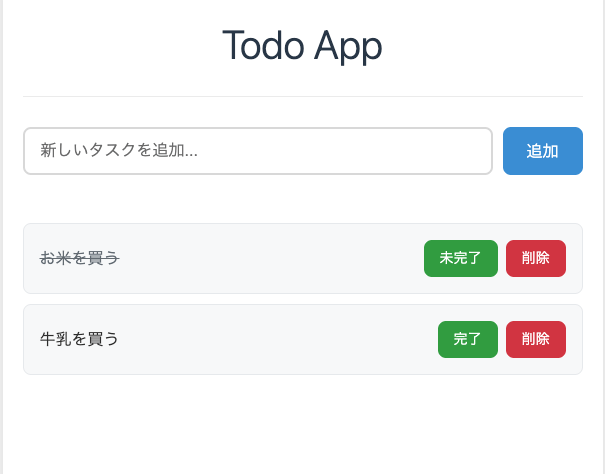
今回実装したToDoアプリはこのような画面になってます。
さいごに
Spec KitとCopilotを使って簡単なToDoを作ってみました。
おすすめ書籍